
Before Continuing
- If operating under multiple currencies, you can follow the common practice of using the prior month's exchange rate as your average exchange rate for the month.
- When entering exchange rates, you must select the appropriate year.
- Exchange rates need to be entered in both directions. For example, COP to USD and USD to COP. This is required if you need to translate from one currency and back again when running reports.
- For more information, view our Foreign Currency Reporting walk-through.
Admin Setup
Before running your reports, you must add the exchange rates for each currency and for each month within the date ranges of your reports by taking the steps below.
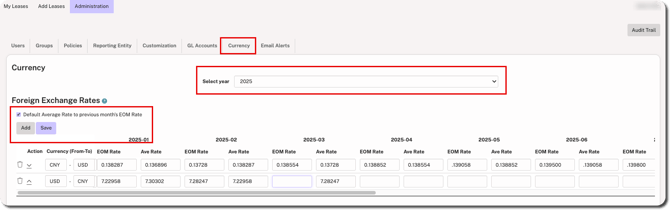
1. Go to Administration > Currency and select the appropriate year.
2. Click the Add button on the left side.
3. Select the box to Default Average rate to previous month's EOM Rate. If this box is later de-selected, it will reset and remove the previous month's EOM rate.
4. Add the exchange rate for each month and then click Save.
REMINDER
To be able to report in both currencies, enter the currency conversion rate in both directions (e.g., CNY to USD and USD to CNY).