
A Reporting Entity may need to be disabled if the incorrect Initial Application Date was entered, the wrong accounting standard was selected, or unused entities need to be removed. The following steps can be taken by an Administrator or Accounting Administrator.
Disabling a Reporting Entity
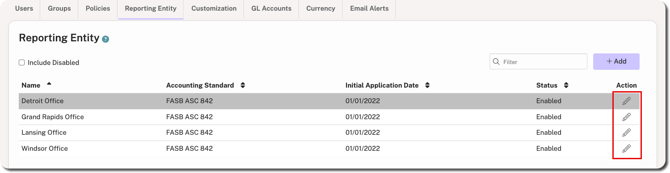
1. Go to Administration > Reporting Entity.
2. Click the edit icon under the Action column for the relevant Reporting Entity.
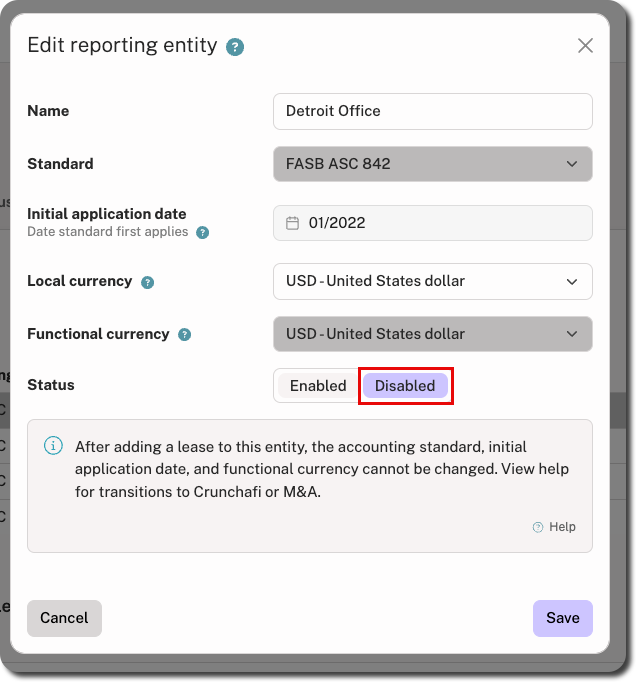
3. Select the Disabled status and click Save in the bottom-right corner.
IMPORTANT
Disabled Reporting Entities are removed from the following areas:
- Add and edit lease flows
- My Leases page (e.g., filters) unless it is being used by an active lease
- List under Administration > Reporting unless you choose to include them
Viewing Disabled Reporting Entities
To view disabled Reporting Entities, select the Include Disabled checkbox in the top-left. To re-enable an entity, open it for editing and select the Enabled status.
