
You may need to uninstall the agent when migrating to a new server, troubleshooting issues, or decommissioning an existing data connection.
⚠️ IMPORTANT
- Uninstalling the BUCS Remote Agent stops all data refreshes from that server.
- Confirm the agent is no longer needed or has already been installed on a replacement server before continuing with the steps below.
- If you are moving the agent to a new server, install and verify the new agent before uninstalling the existing one to avoid data interruptions.
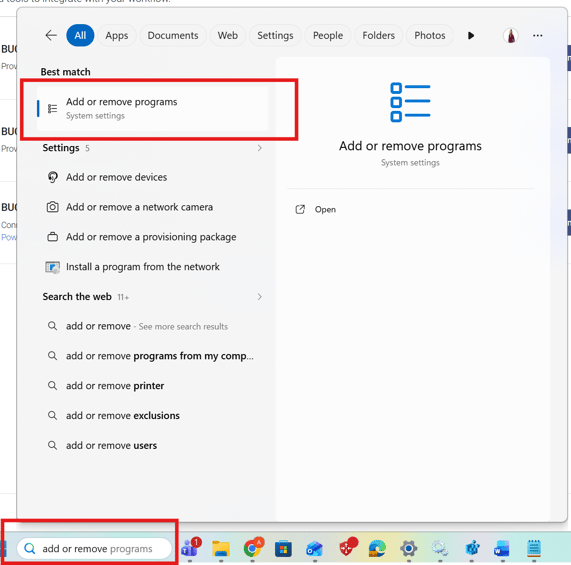
1. Open the Windows Start Menu.
2. Search for and select Add or remove programs.
3. Find BUCS Remote Agent on the list and click on the ... (more) menu at the end of the row.
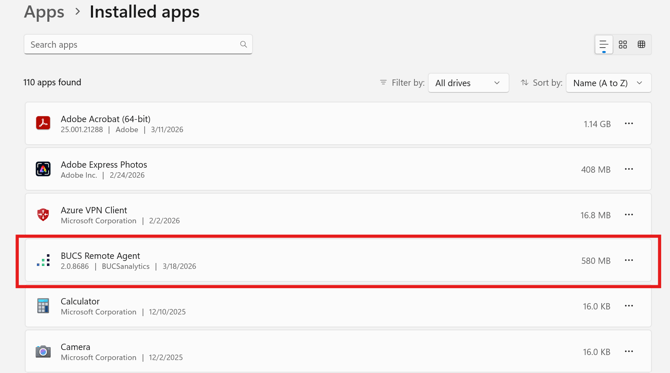
4. Select Uninstall.

5. Follow the prompts to complete the process and click Uninstall.

6. If prompted to confirm, click Yes to proceed.
Verify that BUCS Remote Agent no longer appears in the installed programs list.