
Your company profile provides the BUCS team with the most accurate and recent preferences to build customized datasets. Most company profile details are set during the onboarding process when you first set up your account but can be edited at any time.
🗒️ NOTE
Only users with the Account Administrator role can add, view, and edit company profile details.
Review Company Profile
- Navigate to BUCS Customer Portal > Account Management > Company Profile.
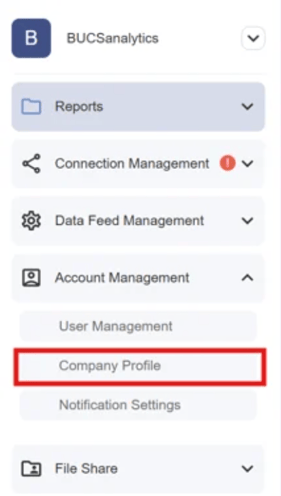
- Review and add or edit details. Fields included on the company profile:
-
Company Information (Required): The company's website and the physical location of the company's headquarters or primary place of business. This includes street address, city, state/province, postal code, and country.
- Contacts (Required): The onboarding contact who is responsible for setting up the company program and the billing contact/email distribution where invoices should be sent.
-
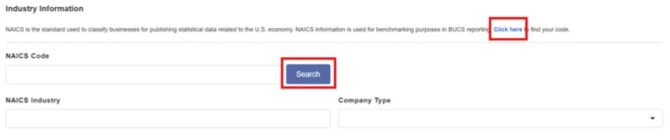
Industry Information (Optional): The North American Industry Classification System (NAICS) code that categorizes the company's primary industry. This standardized code helps in identifying the type of business operations and is useful for market analysis and benchmarking.
💡TIP: If you do not know your NAICS Code, you can click on the Click Here option to find it. After the 6-digit code is entered, you can hit the Search button and the NAICS Industry will populate.
-
Reporting Calendar (Required): The schedule or timeline that the company follows for financial and operational reporting. This can include fiscal year dates, quarterly reporting periods, and any other significant reporting deadlines. This helps determine different ways to layout financial reports and report equity accounts appropriately.
-
Technology Systems (Optional): Details about the primary technology platforms and systems the company uses.
-
General Information (Optional): Provides a comprehensive profile of the company for onboarding and analytical purposes.
-
- Click Save at the bottom of the page to keep any changes you made.
