
TOURIAL_EMBED_HERE
Before Continuing
To continue with the steps below, you must access Crunchafi Lease Accounting via TR Guided Assurance. Click here for instructions. This article only applies to TR customers using the Engagement Manager audit platform. If you logged into Crunchafi via TR Guided Assurance but are using a different audit platform, you will not see the option to send reports. You can, however, still download the report directly to your computer.
Please confirm your client’s Crunchafi lease list is fully up to date for the audit period, including any new leases, terminations, reassessments, modifications, and other updates, and that you have run any relevant Crunchafi reports as covered in our PPC Methodology Playbook.
1. From the My Leases page, select boxes for the relevant leases and click Export for the report you want to generate under the Reports section at the bottom of the page. %20(1).png?width=670&height=376&name=2026-05-29_15-23-49%20copy%20(1)%20(1).png)
2. Click on the Thomson Reuters icon next to the report once it is finished generating (bottom-right corner). .png?width=670&height=194&name=2026-05-29_15-23-49%20(1).png)
3. Click Connect Thomson Reuters Account if prompted.-png.png?width=670&height=188&name=2026-05-29_15-43-44%20(1)-png.png)
4. Click Accept when prompted to authorize access if prompted.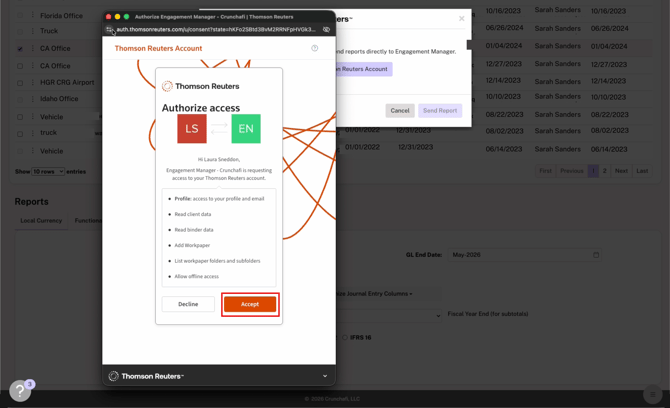
5. The Destination Engagement dropdown list defaults to the engagement you were viewing in TR. Update the engagement or leave as-is, select the destination folder for the report(s), and click Send Report. .png?width=670&height=408&name=2026-06-01_11-31-35%20copy%20(4).png)
6. Click View in Engagement Manager.%20(2).png?width=670&height=408&name=2026-06-01_11-31-35%20copy%20(1)%20(2).png)
7. In TR Engagement, you can find/export the reports under the folder you selected in Crunchafi. To confirm the Crunchafi report name, look under the Description column in TR Engagement. 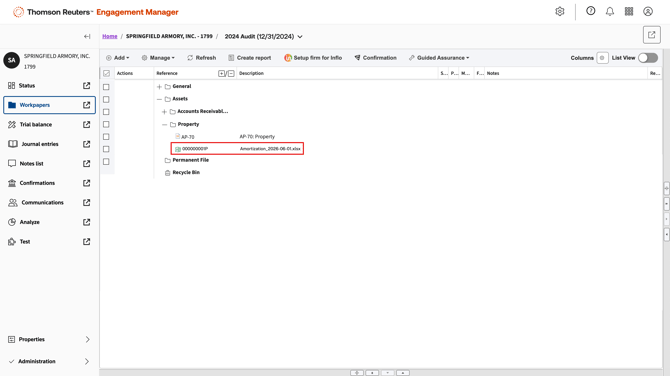
NOTE
Alternatively, you can click the download icon from the report tray in Crunchafi Lease Accounting if you want to export the report directly to your computer.
-1.png?width=670&height=192&name=2026-05-29_15-23-49%20(1)-1.png)